FeaturesSales and billing
Bill atcounter speed.
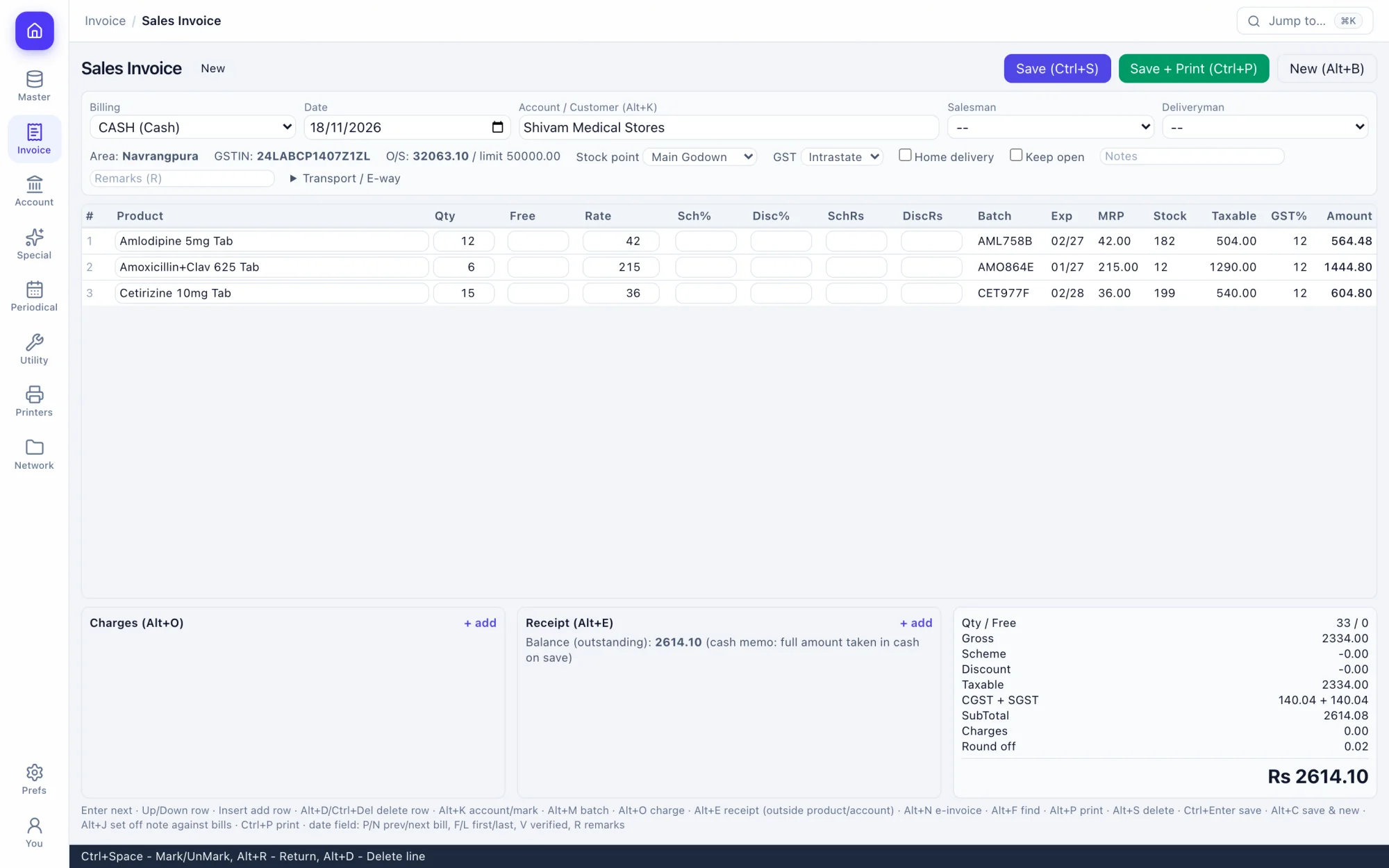
Pick the party, type the product: batch, expiry, MRP, rate and tax fill themselves. The outstanding and credit limit sit above the lines.
How the work goes.
Step 1
Pick the party
Search by name, drug licence or GSTIN. The outstanding and credit limit appear before the first line.
Step 2
Type the product
Search by name or by generic. Batch, expiry, MRP, rate and GST come from stock and the product.
Step 3
Adjust the line
Scheme and discount per line, a different batch on Alt+M, tax detail on Alt+X.
Step 4
Save and print
One key saves the bill, moves the stock and posts balanced ledger entries.
What you get.
GST sales invoice
Batch picked by expiry, scheme and discount per line, CGST and SGST or IGST by the party's state.
Counter POS
A key for every step, kit bills from a bill of materials, repeat the last bill on Alt+9.
Distributor invoice
A wholesale layout with trade and free quantity, for stockist-to-retailer billing.
Search by generic
Find a product by its salt or content as well as its name (Alt+P on the counter).
Returns and credit notes
Sales returns put stock back; credit notes set off against open bills on Alt+J.
Challans and quotations
Delivery challans, quotations and proforma invoices that turn into bills.
Sales orders
Normal and quick order entry, order from a customer list, route checklists and inquiries.
Packing and delivery
Packing slips, delivery sheets, reconciliation and home delivery.
Rates your way
Rate profiles, customer-wise rates, schemes, discounts and discount slabs.
Cashier screen
Bills waiting for payment update live as the counter saves them.
Loyalty points
Point slabs, redemption and a points report.
Extra fields
Add your own fields to a bill and choose which ones print.
Keys you will use.
All shortcuts- SaveCtrlS
- Save and printCtrlShiftEnter
- Print or previewCtrlP
- New billAltB
- Choose batchAltM
- DiscountAltZ
- Tax detailAltX
- Switch GST typeAltShiftG
Screens in this area.
See all screens- Sales Invoice
- Sales Invoice (Distributor)
- Sales Invoice (POS)
- Sales Return
- Sales Return (Distributor)
- Credit Notes
- Delivery Challans (Outward)
- Challan To Invoices
- Quotation
- Proforma Invoices
- Order Sales(Normal)
- Orders (Quick)
- From Customers' List
- Route Checklists
- Inquiries
- Cashier
- Invoice Prints
- Invoice Track
- Packing Slips
- Prepares
- Reconciles
- Home Delivery
- Customized Rates
- Customized Schemes
- Rate Profiles
- Discount Slabs
- Loyalty Point Slabs
- Redeem Points
Try it on your own books.
Fourteen days free with every feature. Pick a firm code and you are billing in a minute.