FeaturesGST and compliance
Tax worked outon every line.
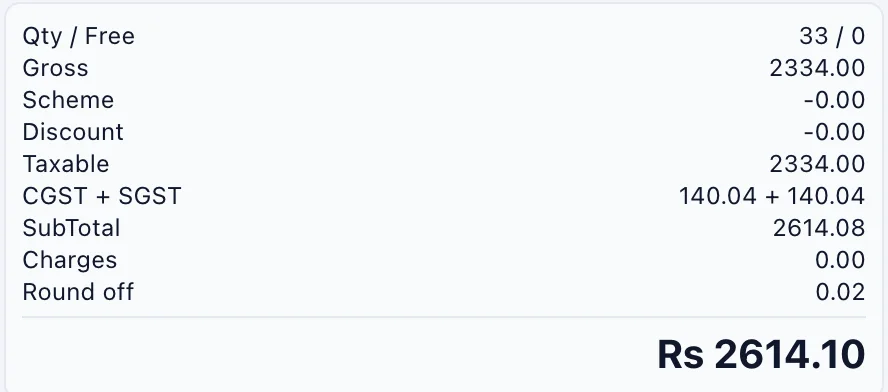
Tax comes from the product and the party, so your GST reports read straight from your bills.
How the work goes.
Step 1
Set it once
HSN and tax category on the product, GSTIN and state on the party.
Step 2
Bill normally
CGST and SGST inside your state, IGST outside it, on every line.
Step 3
Review the period
GST reports show outward and inward supplies by rate.
Step 4
Prepare e-documents
Preview the e-invoice and e-way bill data and queue it from the bill.
What you get.
Tax per line
CGST and SGST inside the state, IGST outside it.
GSTIN check
A wrong GSTIN is caught when the party is saved.
HSN and tax categories
Kept on the product, so nobody picks a rate while billing.
GST reports
Outward and inward supplies by rate, and vouchers by GSTIN.
E-invoice and e-way data
Preview the data and add it to a queue from the bill.
Licences on the party
Drug licence numbers and expiry kept with the customer.
Firm details on prints
PAN, licences, FSSAI, bank and logo on every printed bill.
Keys you will use.
All shortcuts- Switch GST typeAltShiftG
- Tax detailAltX
- E-invoice panelAltW
Screens in this area.
See all screens- GST Reports
- GSTIN wise Voucher
- eInvoice
- VAT Reports
- HSNs
- Tax Categories GST
- Licenses
- Other Inputs/RCM
- Verify Sales
- Verify Purchase
- Edit Company/Firm Data
Try it on your own books.
Fourteen days free with every feature. Pick a firm code and you are billing in a minute.